
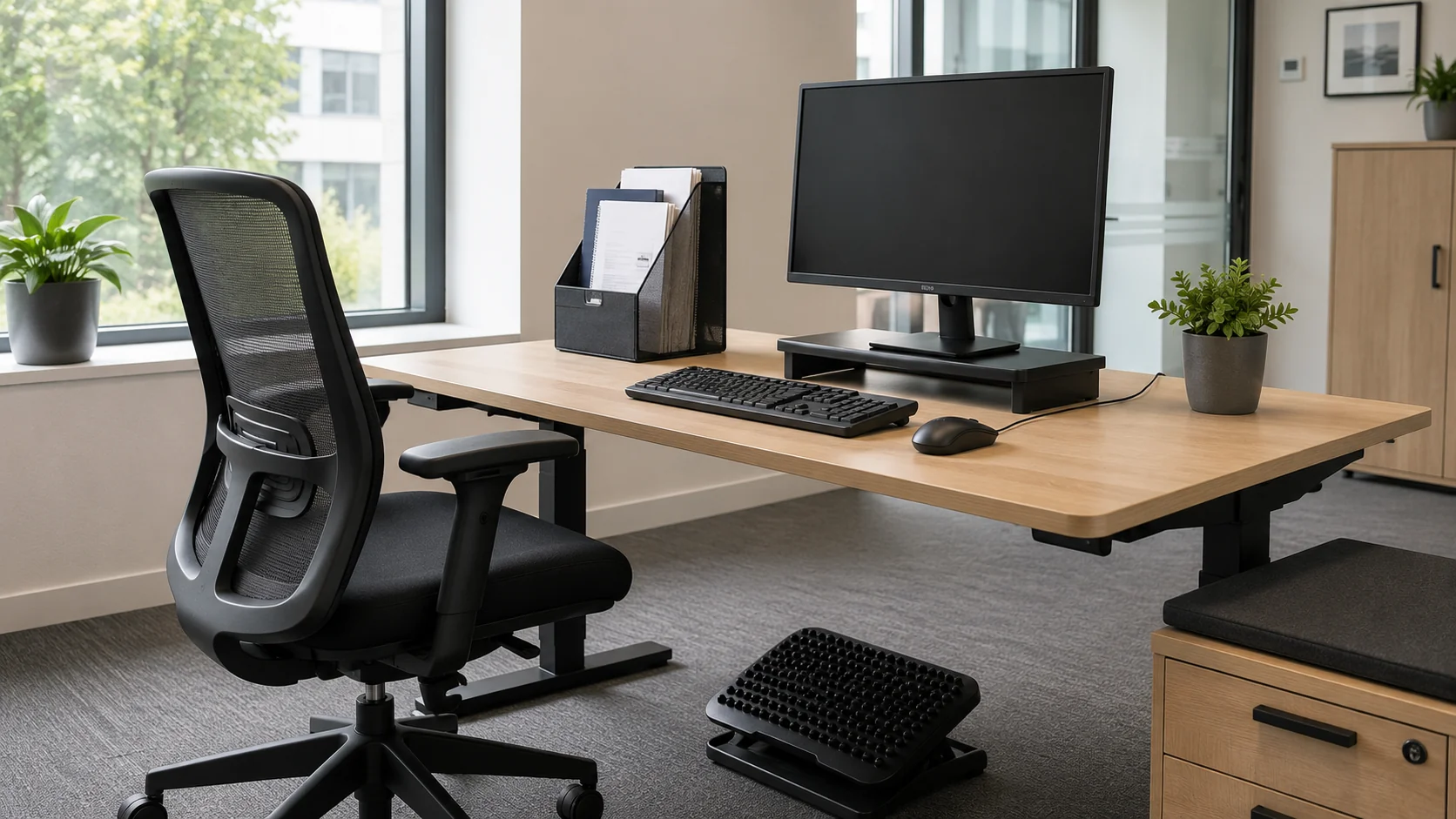
A DSE risk assessment looks at a workstation — screen, keyboard, mouse, chair, desk, environment — and identifies what needs to change to prevent musculoskeletal disorders, eye strain and other display-screen-related ill health. The duty applies to anyone whose work involves regular daily use of display screen equipment for an hour or more at a time, and it applies just as fully to home workstations as to office ones.
The legal duty sits under the Health and Safety (Display Screen Equipment) Regulations 1992, as amended by the Health and Safety (Miscellaneous Amendments) Regulations 2002. The 2002 amendment is the one that extended the regulations clearly to home working and portable devices — a point worth knowing because it means home working has been within the framework for over twenty years, not just since the pandemic.
This page covers what the regulations require, who counts as a "DSE user", how the assessment is carried out, and the specific position for home and hybrid workers.
Who counts as a DSE user
The regulations apply to workers who use display screen equipment "daily, as a significant part of their normal work" — defined in HSE guidance as roughly an hour or more of continuous or near-continuous use per day. The category covers anyone whose job centres around a screen: most office workers, software developers, customer service staff using a screen-based system, designers, journalists, finance professionals.
It also covers home workers and hybrid workers carrying out the same kinds of work from a different location. The duty doesn’t shift to the worker just because the workstation does. It covers contractors and agency workers under your control where they’re doing DSE work for you. And it covers older workers, disabled workers and pregnant workers who may have particular adjustments needs.
It doesn’t apply to occasional users — someone who logs into a terminal a few times a day for short periods, or who uses a screen only as an incidental part of a non-DSE job. The threshold is genuinely about regular, sustained use.
The workstation assessment in practice
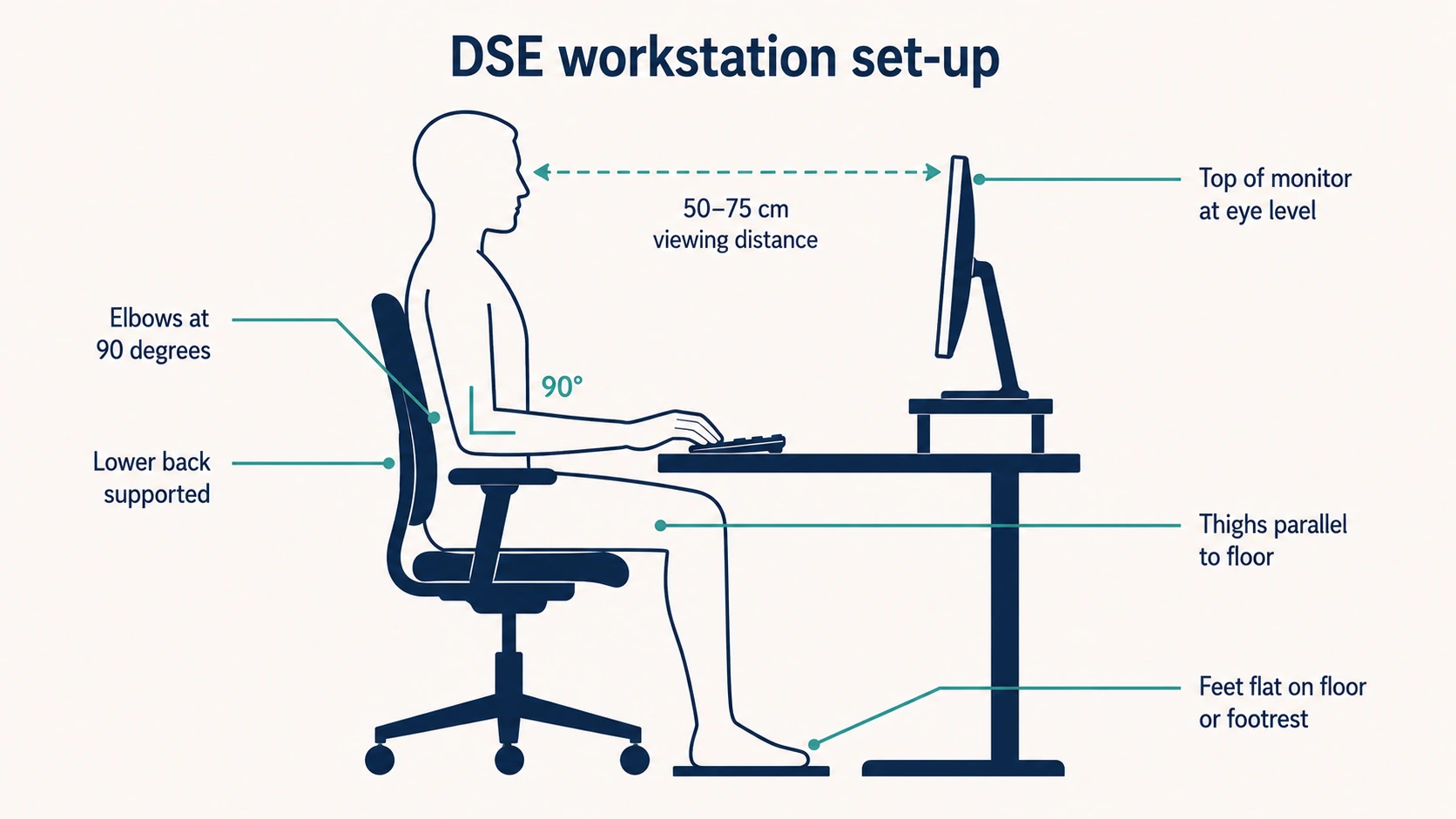
The assessment looks at the whole workstation, not just the screen. HSE’s L26 guidance breaks it into several elements.
The display screen
Size, resolution, refresh rate, glare, contrast and brightness control. The screen should be positioned to avoid glare from windows or overhead lighting, at a comfortable viewing distance (typically 50–75 cm), with the top of the screen at or just below eye level for most users.
The keyboard and mouse
Tiltable, separate from the screen, positioned so the user can adopt a comfortable posture without reaching. The mouse should be within easy reach without extending the arm.
The work surface and chair
The desk should be at the right height to allow the elbows to sit at roughly 90 degrees when using the keyboard. The chair should be adjustable in seat height, backrest position and ideally arm rest height. The user’s feet should rest flat on the floor (or on a footrest if the desk height can’t be adjusted enough).
The environment
Enough space for the user to move and change posture. Lighting that supports the work without glare. Acceptable noise levels. Temperature and humidity that don’t dry the eyes or cause discomfort. Power and data routing that doesn’t create trip hazards.
The software and the task
Software designed for the work, appropriate to the user’s skill level. Tasks structured to provide variety and natural breaks. Realistic targets that don’t drive sustained intensive use without rest.
Most organisations use a self-assessment checklist as the starting point. The worker completes the checklist for their own workstation; the line manager or a competent reviewer follows up on any issues identified. The combination is what produces a defensible assessment — neither the self-assessment alone nor a generic template completed remotely satisfies the duty for a specific workstation.
Eye and eyesight tests
The regulations include a specific entitlement: a DSE user is entitled to a sight test and an examination by an optometrist, paid for by the employer, on request. The test must be repeated at intervals advised by the optometrist (commonly every two years).
If the test shows that the user needs corrective appliances specifically for DSE work — typically because their normal glasses prescription doesn’t suit the screen viewing distance — the employer must pay for the basic provision of those appliances. The duty is for the corrective appliances needed for DSE use, not for the user’s normal prescription glasses; in practice, where bifocals or varifocals would solve both the DSE need and the user’s general vision, the employer’s contribution is typically capped at the cost of basic DSE-suitable lenses.
Visual fatigue from sustained screen use is real but reversible. The legal duty isn’t to prevent eye damage from DSE — there’s no evidence that DSE use causes permanent eye damage — but to manage visual fatigue and to ensure users with vision problems can do their work without strain.
Breaks and task variation
Regulation 4 requires the employer to plan the work so that DSE work is broken up by changes of activity or by short breaks. The principle is that prolonged uninterrupted screen use produces musculoskeletal and visual strain that frequent short breaks largely prevent.
The HSE has consistently recommended short, frequent breaks (a few minutes every hour or so) over long breaks at long intervals. The reason is biological: small position changes and small relaxations of focus prevent the build-up of tension that produces injury, in a way that a single 30-minute break later in the day doesn’t.
Task variation — switching from screen work to a different activity for a period — is at least as effective as taking a formal break, and is what most assessments rely on in practice.
Home and hybrid working
Most online DSE guidance treats home working as a sidebar. It isn’t — for many office workers it’s the primary working pattern, and the regulations apply to the home workstation just as fully as they apply to one in the office.
The duty is the employer’s. The home worker can be asked to complete a self-assessment of their home workstation, but the responsibility to ensure the assessment is suitable and sufficient — and that any identified deficiencies are addressed — remains with the employer.
In practice, employers carrying out home worker assessments take one of three approaches. Some require a written self-assessment with photos, reviewed by a competent person and followed up where issues are identified. Some run virtual assessments by video call with a trained DSE assessor. Some provide an equipment baseline (chair, monitor, keyboard, footrest if needed) to standardise the home set-up.
For hybrid workers the assessment has to cover both workstations. A worker who spends two days a week at home and three days in the office has two workstations, both of which need to satisfy the duty. The office one is typically easier — it’s a controlled environment with standard equipment. The home one needs the same attention to chair, screen, keyboard, lighting and environment.
The regulations don’t require the employer to pay for a home worker’s furniture or broadband. They do require the workstation to meet the regulatory standards — and the practical effect is that employers typically supply or contribute to specific equipment (chair, monitor, ergonomic accessories) where the home set-up wouldn’t otherwise satisfy the duty.
This connects with working from home risk assessment, which covers the broader picture for home working beyond just the DSE workstation.
Special cases
Pregnancy
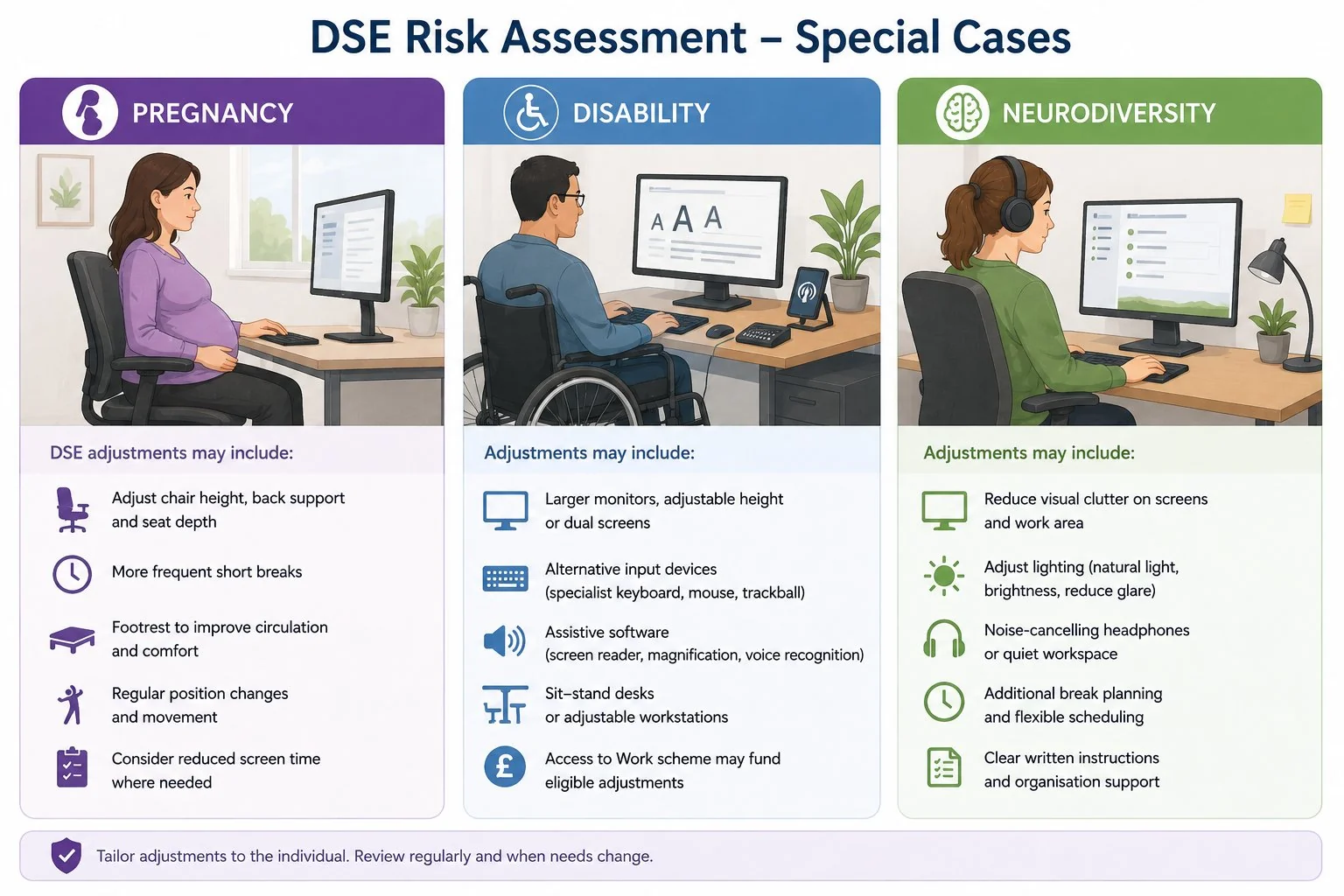
Pregnant DSE users often need adjustments — different chair settings, more frequent breaks, footrests for circulation — and the pregnancy risk assessment should account for any DSE-specific adjustments needed.
Disability
Where the worker has a disability, the Equality Act 2010 reasonable-adjustments duty engages alongside the DSE duty. Adjustments might include specific input devices, screen reader software, larger monitors, voice recognition, sit-stand desks, or modified working patterns. The Access to Work scheme is a useful funding route for some adjustments.
Neurodiversity
Specific adjustments — reduced visual clutter on screens, different lighting, additional break planning, noise-cancelling headphones — can make significant differences for autistic workers, workers with ADHD or dyslexic workers, and the assessment should consider whether these are needed.
The connection to MSDs
Musculoskeletal disorders (MSDs) are by some margin the largest category of work-related ill-health affecting DSE users. The HSE’s 2024/25 statistics record 511,000 UK workers reporting work-related MSDs and 7.1 million working days lost. Not all of these come from DSE work, but a substantial proportion do — particularly neck, shoulder and back pain related to sustained poor posture.
The legal exposure is real. A worker bringing a civil claim for an MSD that they attribute to DSE work will rely on the absence (or inadequacy) of a documented workstation assessment as evidence of breach. An employer that has conducted assessments and acted on the findings is in a defensible position; an employer that has stuck a paper template in a folder and ticked the compliance box is not.
Records and review
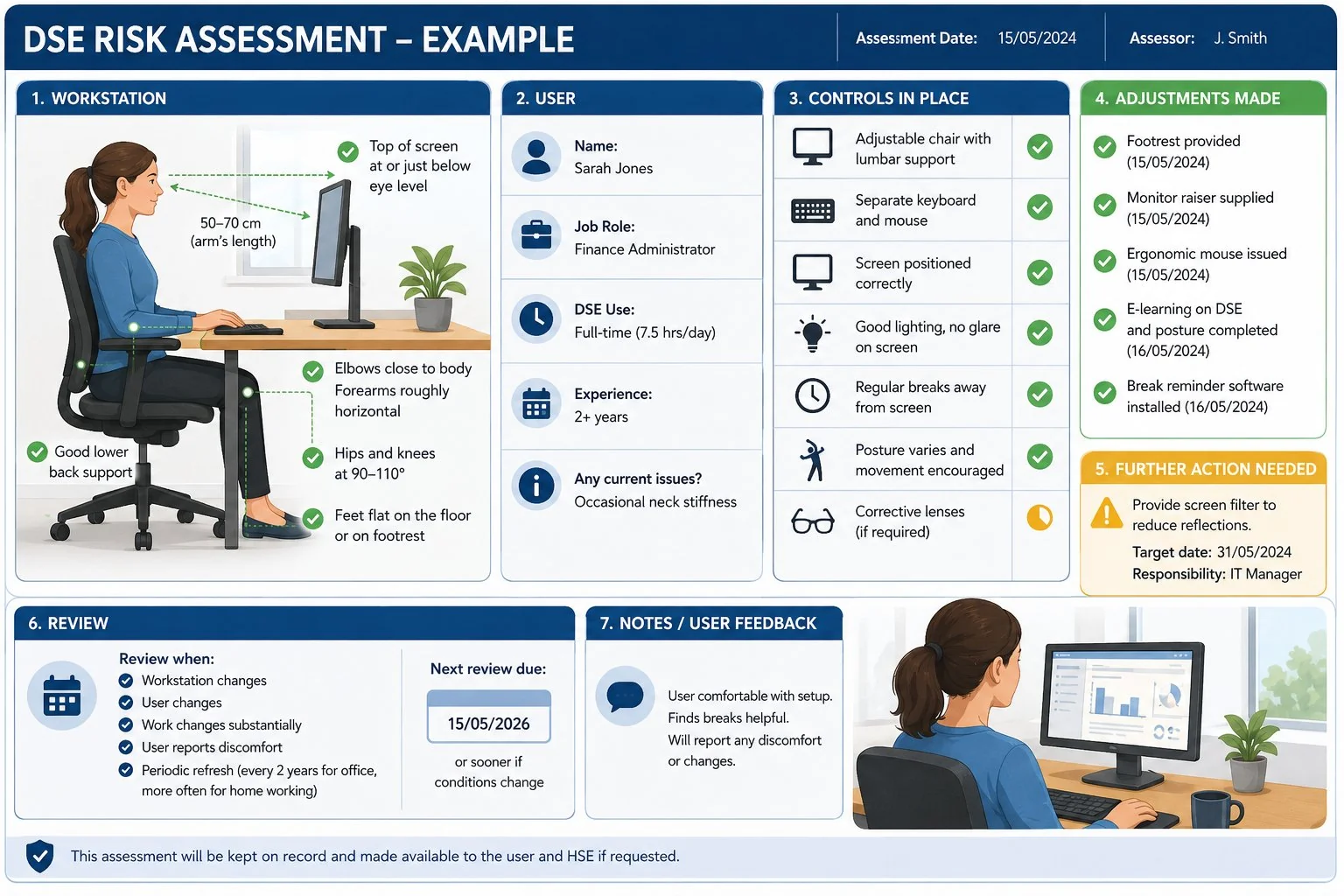
The assessment record should cover the workstation, the user, the controls in place and any further action needed. Where adjustments have been made — equipment supplied, working pattern changed, training delivered — the record should reflect that.
Review is required whenever the workstation changes, the user changes, the work changes substantially, or the user reports discomfort. For a stable office workstation a periodic refresh (typically every two years) is good practice; for home workstations, where conditions change more often, more frequent review is appropriate. We cover the general review framework in our page on how often a risk assessment should be reviewed.
Where this connects
DSE risk assessment overlaps with working from home risk assessment (which covers the broader home working duty beyond just the screen), stress risk assessment (because workstation problems and stress frequently co-occur in office workers), and pregnancy risk assessment (for DSE adjustments during pregnancy).
For organisations with significant DSE-using populations — most office-based employers, all hybrid workplaces — building competence in DSE assessment is worth the investment. Formal Risk Assessment Training covers the general method; DSE-specific training is then layered on for assessors who will support workstation reviews.
Frequently asked questions
Who counts as a DSE user under UK law?
A worker who uses display screen equipment daily, as a significant part of their normal work — usually interpreted as an hour or more of continuous or near-continuous use per day. The category covers office workers, developers, designers, customer service staff and anyone else doing sustained screen-based work, including from home.
Do home workers need a DSE risk assessment?
Yes. The 1992 regulations, as amended in 2002, apply to home workstations as fully as they apply to office ones. The employer’s duty to assess and ensure a suitable workstation doesn’t transfer to the worker just because the workstation is in their home.
Does my employer have to pay for my glasses?
Where a DSE eye test identifies that the user needs corrective appliances specifically for DSE work — typically because their normal prescription doesn’t suit the screen viewing distance — the employer must pay for the basic provision of those appliances. The duty doesn’t cover the user’s normal prescription glasses if they would have needed those anyway.
How often should a DSE assessment be done?
There’s no fixed legal interval. The assessment should be carried out for new users, repeated when the workstation changes (new equipment, new location), repeated when the user changes (different person at the same desk), and reviewed when the user reports discomfort. Periodic refresh — typically every two years for stable workstations — is good practice.
Do hybrid workers need two assessments?
Yes — one for each workstation. A worker who splits their time between home and office has two workstations, both of which need to satisfy the regulations. The office one is typically a shared standard environment; the home one needs specific attention to whether it meets the regulatory standards.
Related guides
- How often should a risk assessment be reviewed?
- Who can carry out a risk assessment? The competence question explained
- Risk assessment examples: three worked examples for UK workplaces
Make sure your managers and assessors are trained to carry out clear, defensible risk assessments.
Explore the Risk Assessment Training course →
Mark writes about workplace health & safety, risk assessment and accredited online training for Risk Assessment Training, part of Online CPD Academy.